Deposit to Y888 Game
Funding your Y888 wallet comes down to three routes - JazzCash, EasyPaisa or a straight bank transfer - and the mobile wallets are the quicker pair of the two. Jump straight to your preferred method, or keep scrolling for the comparison and troubleshooting sections below.
| Method | Minimum deposit | Minimum withdrawal | Typical speed |
|---|---|---|---|
| JazzCash | Rs. 100 | Rs. 500 | A few minutes |
| EasyPaisa | Rs. 100 | Rs. 500 | A few minutes |
| Bank Transfer | Rs. 500 | Rs. 500 | Up to 24 hours |
Treat these as a snapshot rather than gospel - whichever deposit screen you land on inside the app has the live, current numbers.
Deposit Steps by Method
The underlying flow is the same across all three - wallet, method, amount, confirm - but the screens and settlement time differ enough to cover separately.
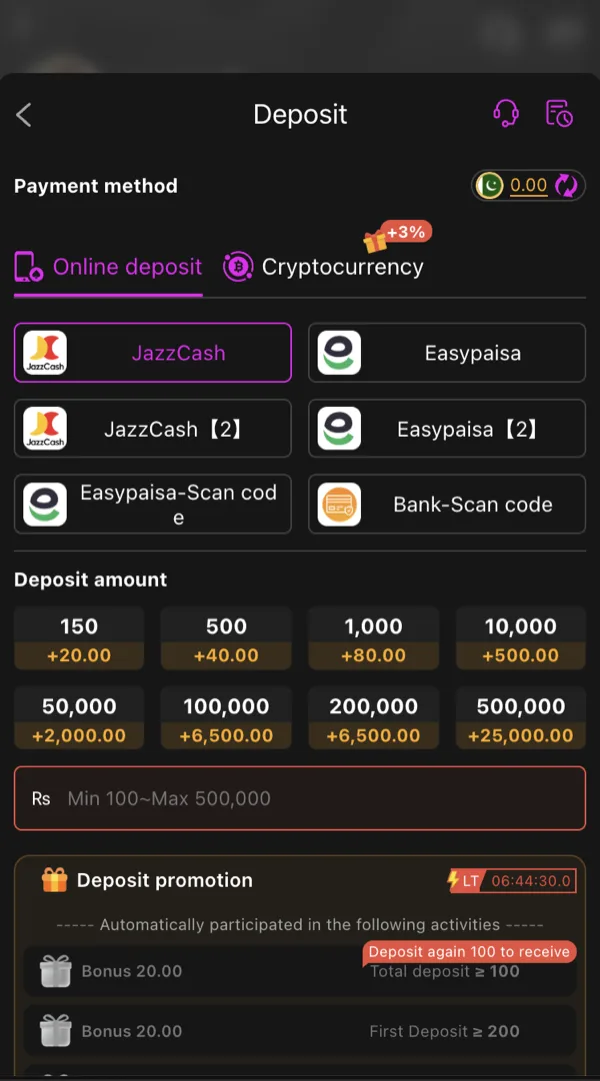
Sign in and pull up your wallet
From your Y888 home screen, tap your balance to open the wallet, then look for the Deposit option.
Pick JazzCash from the list of methods
You'll land on a screen with the destination account details for this specific session.
Type in your deposit amount and confirm
Anything from Rs. 100 up works. Give the figure a second look before moving on - it's the step people rush through most.
Switch to JazzCash and send it
Match the amount exactly and authorize with your MPIN. Once JazzCash shows the transfer as successful, head back to Y888 - the balance typically updates within a few minutes without any extra action from you.
Get into your account and find Deposit
Tap your wallet balance from the home screen and select the Deposit option.
Select EasyPaisa
The screen that follows shows where to send your funds for this particular session.
Punch in the amount
The floor here is the same Rs. 100 as JazzCash.
Finish the payment inside EasyPaisa
Send the exact figure, enter your PIN to authorize, and wait for EasyPaisa itself to confirm the transfer went through. Your Y888 balance follows shortly after, usually within a few minutes.
Log in, then open your wallet
Same entry point as the two mobile-wallet methods.
Pick Bank Transfer as your method
You'll be shown a receiving account number, the bank it belongs to, and the exact title to send under. The minimum here steps up to Rs. 500.
Transfer the amount from your own banking app
Whatever internet banking or mobile banking app you use, send the precise figure you entered on Y888.
Save your transaction reference
Bank transfers submitted outside regular banking hours can take up to a day to land. Hang onto the reference number in case you need to follow up with support.
Comparing the Three Methods
JazzCash: most players reach for this first - it's a direct wallet transfer that clears in a handful of minutes and only needs Rs. 100 to get moving.
EasyPaisa: effectively a mirror image of JazzCash on speed and cost - go with whichever one you've already got set up on your phone.
Bank transfer: sits apart from the other two - Rs. 500 to start, and however fast your own bank moves is however fast this goes. Good to have as a backup when a mobile wallet isn't an option.
None of the three carry a deposit fee from Y888's end - whatever gets charged, if anything, traces back to JazzCash, EasyPaisa or your bank's own policies. For a deeper side-by-side breakdown, see the full payment method comparison on the blog.
If Your Deposit Doesn't Reflect
Sent the payment, but the wallet hasn't updated: don't panic right away - a short delay is normal. If JazzCash or EasyPaisa runs past an hour, or bank transfer past several, reach out to support and have your transaction ID ready.
Credited amount doesn't look right: go back and check exactly what you sent versus what you intended to - a typo on the payment app's side is behind most of these cases.
Your JazzCash/EasyPaisa app still shows "pending" or "failed": that means the money is still sitting on your end. Let it settle there first - a transaction that fails on the payment app's side was never actually sent, so there's nothing on Y888's end to chase yet.
Accidentally deposited twice: each transfer should land as its own line item in your history. If you only see one, open a support ticket and include both transaction IDs.
Have these ready before contacting support: your registered number, the transaction ID, the amount, and roughly when you sent it - that combination clears up most deposit questions quickly.
Deposit Bonuses and the Download Bonus
No deposit is needed to unlock the Rs. 100-999 download bonus - that's credited automatically once registration is complete. Anything you deposit afterward is your own money added to the same wallet, on top of the bonus.
Bonus balance and wagering
Download bonus and referral payouts typically come with a playthrough requirement before they (or winnings from them) can be withdrawn. Since bonus funds and deposited funds sit in the same wallet, they blend together once you start playing - read the offer terms before betting, not after. The withdrawal guide covers how this plays out at cashout.
Deposit Safety
Stick to the account details Y888 shows you on the deposit screen itself. If someone reaches out asking you to send funds elsewhere, whether or not they claim to work for Y888, that's not how a real deposit works here.
Anyone asking for a fee to "release" your deposit is running a scam. A completed deposit on Y888 never needs a second payment to unlock it.
Fund your wallet from a payment account that's genuinely yours. Beyond being good practice, it's what keeps a future withdrawal from getting held up.
Decide how much you're depositing before you open the app, not while you're mid-session. Treat it as money you can afford to part with, and remember Y888 is restricted to players 18 and older.
Funded and Ready
Balance updated? Head to the games list on the home page, or check the bonus terms before your first bet.